Delivery in 2-3 working days

What kinds of ports does a TV have?
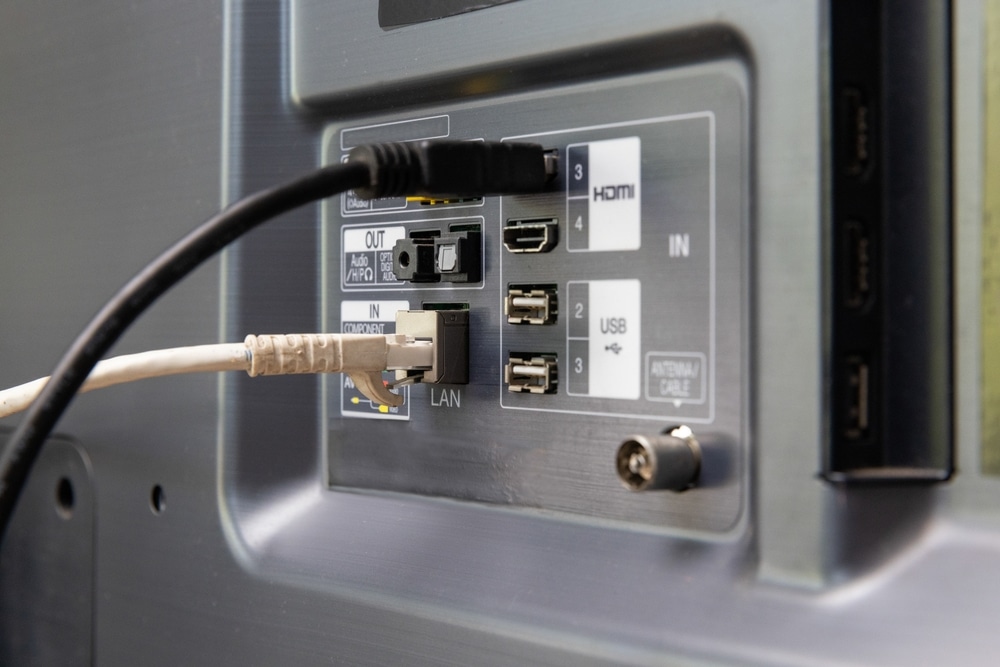
Things can quickly get confusing behind the TV. There are a dozen ports, many of which look alike, and the labels are tiny. However, the ports on most TVs are similar, so figuring them out once will help you keep things straight.
Modern Connections
On a modern smart TV, a small number of versatile ports handle almost everything. These ports operate digitally, transmit high-quality video and audio, and are usually small but clearly labeled, allowing for quick connection of external devices and speakers. A notable trend is the move toward fewer and fewer ports. These days, a single HDMI port can transmit both video and audio simultaneously. In addition, many functions now operate wirelessly. Today’s standard features can be summed up by a handful of ports.
HDMI
HDMI is the most important connection. Video and audio are transmitted together over a single cable in digital form, which is exactly why almost every modern device is connected to the TV via HDMI—from game consoles to set-top boxes, Blu-ray players, and streaming sticks. There are usually several of these ports, so you don’t have to keep switching cables. A standard HDMI cable is sufficient for most devices; a special one is only needed for very high resolutions. Some HDMI ports also send the audio back out, for example to a soundbar. The abbreviations for this are ARC and eARC. There are also several versions of HDMI, which make a noticeable difference especially at high resolutions and when gaming.
Optical Output (Toslink)
The optical output, usually called Toslink, sends the audio via an optical cable to a soundbar, stereo system, or home theater. The optical output does not transmit sound electrically, but rather via light in a thin fiber-optic cable. This makes the connection resistant to electrical interference, but the cable should not be sharply bent. It can transmit multichannel audio up to 5.1; however, the bandwidth is no longer sufficient for newer uncompressed audio formats—that’s what HDMI with eARC is designed for.
Headphone jack (3.5 mm)
Wired headphones plug into the analog 3.5-mm jack. This is the same jack found on headphones for cell phones. It’s helpful if you can adjust their volume independently of the TV speakers. However, this jack is increasingly absent from new devices. If you still prefer wired headphones, you can use a small converter connected to the optical output, which converts the digital signal back to analog.
Bluetooth
Bluetooth is the wireless alternative to the headphone jack. Bluetooth connects headphones or speakers wirelessly to the TV. This is especially convenient if the TV no longer has a headphone jack, which is often the case with newer models. One drawback can be an audible delay between the picture and the sound; how noticeable this delay is depends on the TV, the headphones, and the Bluetooth codec used.
USB
USB ports on TVs work similarly to those on computers. You can connect USB flash drives and external hard drives to them, and occasionally a keyboard or gamepad as well. Older ports use the USB 2.0 standard, while newer ones use USB 3.0, which is about ten times faster and can be identified by the blue interior of the port. Many TVs can also record live programs via USB, provided the hard drive connected to the designated port receives sufficient power. On some devices, the port also supplies enough power for a streaming stick.
Connections from the Past
Older TVs come with a whole other set of ports. These date back to the pre-HDMI era and still transmit video and audio analogously—that is, via separate cables and with somewhat variable quality. They’ve almost disappeared from newer models and are becoming increasingly rare. If you need this type of connection, you should check before buying to see if the TV even has the port anymore.
SCART
The wide, 21-pin SCART connector used to transmit video and audio analogously in both directions. For a long time, it was the primary connection between televisions, VCRs, and game consoles. With the shift to digital technology, HDMI has almost completely replaced it, which is why it’s rarely found on new televisions anymore. If you want to connect an old VCR or an older game console, you’ll need an adapter that converts the analog signal to an HDMI signal. While such adapters are available, they don’t always produce a flawless picture.
VGA
For a long time, the VGA port was used to display a computer's image on a television. It transmits a purely analog signal and carries only video; a separate cable was always required for audio. It has practically disappeared from modern devices, since computers and laptops are now connected via HDMI.
RCA, Component, and Composite
The colored RCA jacks also date back to the analog era and come in two varieties. With composite video, a single yellow jack carries the entire image, which provides the simplest but also the poorest image quality. With component video, the video signal is split among a red, green, and blue jack, allowing for a sharper image; the audio is transmitted via two additional RCA plugs in red and white. Both types have become rare on modern TVs and can usually only be used with an adapter.
TV Connections and Their Relevance Today
In everyday use, only a handful of connections really matter these days. HDMI supports almost all source devices and, with ARC or eARC, also transmits audio to the soundbar. You can listen to audio exclusively through headphones via the headphone jack or Bluetooth without using the TV speakers, and a USB port allows you to connect storage devices or record content. The older ports are really only relevant if you need to connect an older device.
Frequently asked questions
Broadly speaking, there are four types. HDMI transmits both video and audio simultaneously; dedicated audio outputs, such as the optical output or the headphone jack, transmit only audio; USB is used for storage and recording; and older analog connections, such as SCART or VGA, date from before HDMI. In addition, there is Bluetooth for wireless connectivity.
Analog connections include the 21-pin SCART connector, the colored RCA jacks for component and composite video, and the VGA connector for the computer. The 3.5-mm headphone jack is also analog. On new televisions, these connections are rarely found anymore, with the exception of the headphone jack.
Cable TV is received through the round antenna jack on the TV, into which a coaxial cable is plugged. The same jack is used for cable reception via DVB-C and antenna reception via DVB-T2. Encrypted channels also require a module with a smart card in the CI slot.
Today, televisions primarily feature HDMI for video and audio, an optical output and a headphone jack for audio, Bluetooth for wireless connections, and USB for storage and recording. In addition, there are older connectors such as SCART, VGA, and RCA, which are rarely found on new models.
Connections can be categorized by signal type. Digital connections, such as HDMI, USB, and the optical output, transmit signals without loss, while analog connections, such as SCART, RCA, or the headphone jack, use traditional signals. In addition, inputs that receive a signal are distinguished from outputs that transmit sound, and wired connections are distinguished from wireless connections such as Bluetooth.