
HDMI ARC and eARC on Your TV
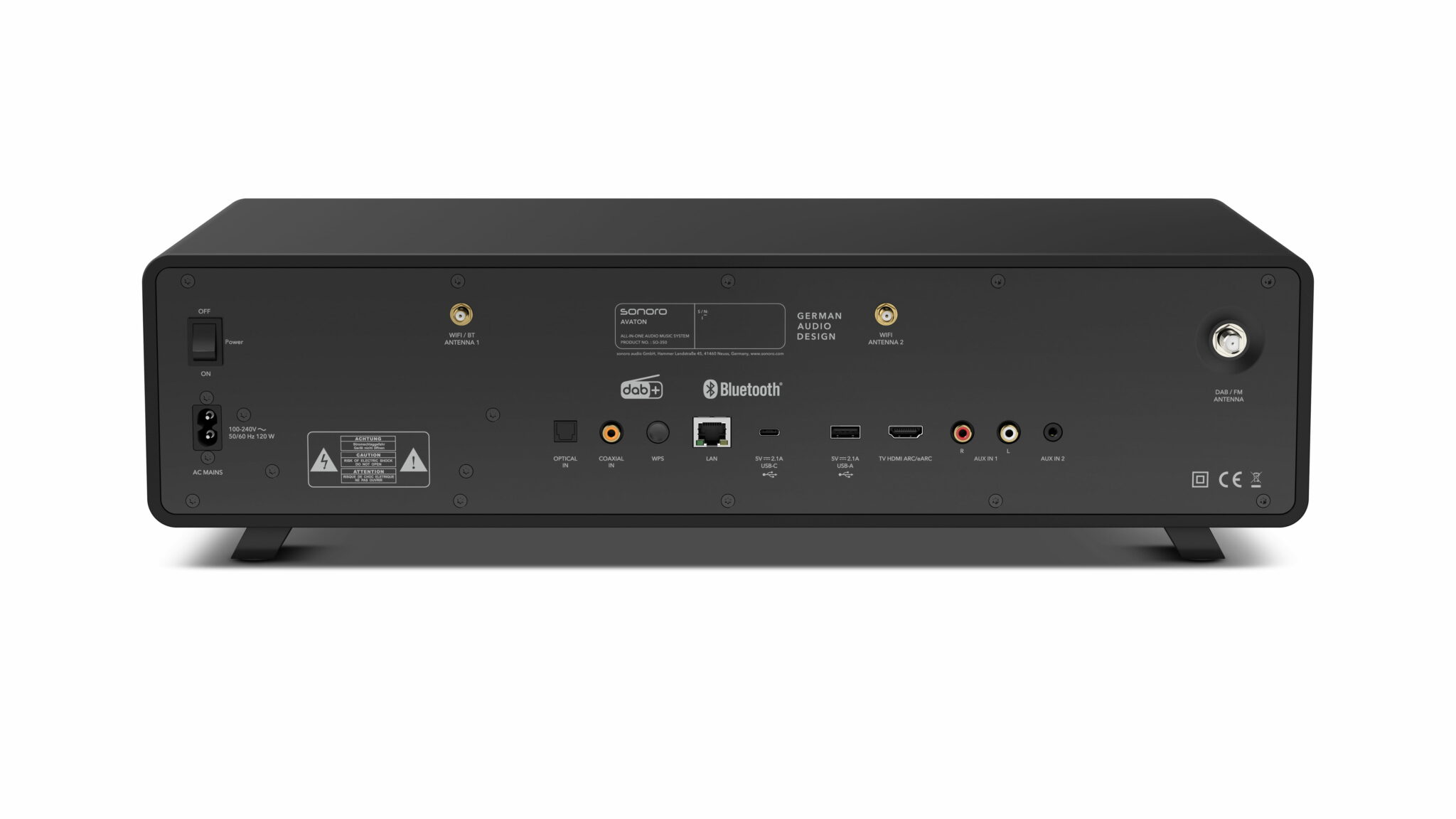
HDMI ARC sends TV audio back through the same cable that transmits video. If you have a soundbar or another amplifier connected to your TV, this saves you a second cable. For several years now, the enhanced eARC version has been available, allowing significantly more audio data to pass through.
Which audio formats reach your audio device depends on whether HDMI ARC or the enhanced version is in use. Both are located on a specially marked port and must be activated in the audio menu. If there’s no sound, the cause can usually be found in a few steps.
What is HDMI ARC
The Audio Return Channel solves a problem that arose with the first flat-screen TVs. Video and audio enter the device via HDMI, but the audio needs to go back out to a soundbar or amplifier. Previously, this required a second cable, usually an optical one. The return channel combines both directions into a single cable. The following paragraphs explain how this works and how to identify the correct port.
The Return Channel Explained
ARC stands for Audio Return Channel. This function uses the same HDMI cable in both directions. The video travels from the source device to the TV, and the audio travels from the TV back to the audio device. This eliminates the need for a separate optical cable. The return channel was introduced with HDMI 1.4. Accordingly, it can be found on many TVs from recent years.
This is especially important for content originating directly from the TV itself. If you use a media library or a streaming service via the TV’s apps, there is no external source device whose audio you could tap into. The audio must therefore leave the TV. This is precisely what the return channel is responsible for.
How to Identify the Port
Not every HDMI port on your TV (there are often several) can support the return channel. Usually, it’s just one. It will have the designation ARC or eARC next to its number. On the audio device, the corresponding port is often labeled HDMI OUT with the same designation. If the cable is plugged into a regular input, you’ll get video but no audio return.
On many devices, the label is above the jack, but on some, it’s very small next to the jack or occasionally only in the user manual. If you are unsure, you can find the information in the TV’s technical specifications under the connections.
What Changes Compared to an Optical Cable
Before the introduction of the return channel, the path from the TV to the audio device was via the optical output. This method still works perfectly today and is still available on many devices. The optical output transmits stereo and compressed multi-channel audio; however, it lacks the bandwidth for high-resolution formats. Additionally, the return channel allows you to control the audio device’s volume with the TV remote. With an optical output, a second remote control is usually needed for this.
What eARC Does Differently
With HDMI 2.1, the enhanced version of the return channel was introduced. The “e” stands for enhanced. From the outside, the port looks the same. Technically, however, HDMI eARC has made a significant leap compared to HDMI ARC. The advancement primarily concerns the amount of audio data that can pass through. Whether the difference is noticeable in your own living room, however, depends on other factors.
Significantly More Bandwidth
The original return channel was designed for compressed audio formats. This is sufficient for stereo and multi-channel audio like Dolby Digital or DTS. However, high-resolution audio tracks do not pass through completely. They are either down-sampled or not transmitted at all.
eARC has its own data connection for audio, providing significantly more capacity. According to the HDMI Licensing Administrator, eARC transmits uncompressed signals with up to 192 kHz sampling rate and 24 bit, as well as uncompressed 5.1 and 7.1. This means formats like Dolby TrueHD, Dolby Atmos, DTS-HD Master Audio, and DTS:X arrive completely at the audio device.
eARC uses an enhanced data transmission between the TV and the audio device. This provides more bandwidth, better device recognition, and functions for synchronizing video and audio.
When the Difference Becomes Noticeable
If you primarily watch linear television, you will hardly notice a difference, as the broadcast signal is already compressed. However, with high-resolution audio tracks from Blu-ray or streaming services offering such content, eARC can transmit the full scope, thus achieving a noticeable optimization.
For speech intelligibility, however, bandwidth is only one of several factors. A larger data stream, for example, does not automatically make dialogues clearer. Whether speech comes through clearly depends more on the audio mix, the speaker, and the room.
| Feature | ARC | eARC |
|---|---|---|
| Introduced with | HDMI 1.4 | HDMI 2.1 |
| Stereo and PCM | yes | yes |
| Dolby Digital, DTS | yes | yes |
| Dolby TrueHD, DTS-HD Master Audio | limited | yes |
| Uncompressed 5.1 and 7.1 | no | yes |
| Video-Audio Synchronization | device-dependent, often manual | improved, automatically provided |
| Recommended Cable | High Speed | Ultra High Speed |
ARC covers stereo and compressed multi-channel audio and is sufficient for linear television. eARC is worthwhile if high-resolution audio tracks are to reach the audio device unchanged.
Pros and Cons at a Glance
- One cable for video and audio, less cabling
- Audio from TV apps reaches the audio device directly
- Volume remains controllable via the TV remote
- Available on many TVs from recent years
- Only one port on the TV supports the function
- Both devices must communicate cleanly, otherwise there will be no sound
- eARC requires compatible devices and a newer cable
- The audio remains tied to a fixed device in the room
Which Cable is Needed
The return channel places demands on the cable, and these differ between the two variants. For ARC, the HDMI cable that almost everyone has at home is usually sufficient. For eARC, however, cables that are too old regularly lead to dropouts or a complete lack of sound. HDMI cable classes are certified and recognizable by their designation.
High Speed is Sufficient for ARC
For the basic return channel, a High-Speed class cable is usually sufficient. Such cables are included with many devices and have been common for years. An upgrade is usually not worthwhile here, as long as the connection runs stably.
Ultra High Speed for eARC
If you want to use eARC, it’s better to opt for an Ultra-High-Speed cable. The higher data rates can overwhelm older cables, resulting in dropouts or a complete lack of sound. Ultra-High-Speed cables are generally backward compatible. So, they also work with devices that only support the basic return channel.
If the Cable Needs to Be Long
Over short distances in the living room, copper cables are unproblematic. With increasing length, susceptibility to interference increases, and the broadband return channel, in particular, reacts sensitively to this. The HDMI specification does not state a fixed upper limit. The quality and construction of the cable are decisive. For ceiling installations or large rooms, there are optical HDMI cables that transmit the signal as light and remain more stable over distance.
Setting Up HDMI ARC
The connection itself is quick, but setting it up in the menu usually takes more time than connecting the cable. The following sequence helps avoid common pitfalls. It’s more practical than you might think. If you follow it, you’ll notice after each step if something is wrong, instead of ending up with a device that has no sound. The menu items may be named differently depending on the manufacturer, but the underlying logic is the same everywhere.
1. Choose the Correct Port
The cable must be plugged into the port labeled ARC or eARC on both devices. On the TV, this is an HDMI input; on the audio device, it’s usually a dedicated HDMI output. If only one of the two devices supports eARC, the connection automatically continues in the basic mode.
2. Change the Audio Output
In the TV’s audio menu, the output must be switched from the internal speakers to the external device. This menu item is usually found under Sound or Audio Output. This is an important setup step. Without it, the audio will remain in the TV, even if the cable is correctly connected.
3. Activate Device Control
The return channel works closely with device control via HDMI, which operates under the abbreviation CEC. It ensures that the external device turns on with the TV and that the volume remains controllable via the TV remote. In the menu, this function has a different name for almost every manufacturer, but it refers to the same thing everywhere. It must be active on both devices.
4. Check the Result
After switching, the sound should come from the external device, and the internal speakers should remain silent. If sound comes from both sources simultaneously, the output in the menu is still set to parallel output and needs to be adjusted. A quick test with a program where someone is speaking will show faster than music whether the connection is clean and synchronized.
It is also useful to test with different sources. A media library via the TV app and another connected external device do not necessarily behave the same way because they deliver different audio formats.
If There’s No Sound
The return channel doesn’t always work right away. This is rarely due to a device defect. Four causes cover most cases. They can be tested sequentially. It’s sensible to briefly check after each step whether the sound has returned, instead of changing several things at once. If it remains silent after each step, this significantly narrows down the search.
1. The Devices Haven’t Connected
When connecting, devices exchange various information. If this synchronization fails, there will be no sound. In this case, it often helps to disconnect both devices from power for a few minutes, then turn on the TV first, followed by the audio device. Firmly re-inserting the cable at both ends is also worthwhile and is more often the source of the problem than expected.
2. The Audio Format is Incompatible
The TV outputs audio in a specific format, and the audio device must be able to handle it. If the output is set to a multi-channel format that the other device does not support, nothing will be received. In this case, switching to PCM usually helps, as this format is understood almost everywhere. The menu item is usually found under advanced audio settings.
3. Source Devices are Connected to the Wrong Device
If receivers, soundbars, or game consoles are connected directly to the TV, the TV must pass the audio on. This doesn’t work with every format, and with the basic return channel, it may sometimes be reduced to stereo. If you want the full audio track, it’s better to connect such devices directly to the amplifier and send the video from there to the TV.
If audio and video become out of sync after switching, this is due to processing time in the chain. With eARC, automatic correction is provided; with the basic return channel, the delay can be manually adjusted depending on the device. Turning it off and on again also frequently solves this problem.
4. Device Control is Disabled
Some TVs only deliver audio via the return channel if device control via HDMI is active. It is sometimes accidentally deactivated in the settings, e.g., after a reset or an update.
If, after going through and testing points 1-4, there is still no sound, try testing with a different cable. Defective or outdated cables are rarely immediately obvious. They often lead to sporadic dropouts that are difficult to attribute to a single cause.
Where the Return Channel Reaches Its Limits
Not every TV room can be effectively wired using the return channel. Typically, three scenarios regularly occur where a different approach is better or perhaps the only option. In all three, the optical output remains the quickest alternative, as it is available on most TVs and is sufficient for stereo and compressed multi-channel audio.
Older Amplifiers Without Digital Input
Many well-preserved systems do not have an HDMI port. The audio can still be used, namely via the TV’s optical output and a converter that transforms the digital signal into an analog one. The TV usually needs to be set to a simple stereo format for this.
If the Sound Shouldn’t Fill the Entire Room
The return channel leads to a fixed device in the room. If you want to bring the sound closer to your seating position or listen quietly without disturbing others, this won’t work. In this case, the path leads via the optical output or the headphone jack to a wireless speaker.
This can also be combined. A soundbar is connected to the return channel, a second device to the optical output. Both paths then run in parallel, although due to different processing times, an audible delay between the devices may occur.
If Only One Port is Available
On older or very basic TVs, the return channel is not available, and often the one existing port is already occupied by another device. In that case, the optical output remains, which can be found on most TVs and is sufficient for stereo and compressed multi-channel audio.
Frequently Asked Questions
HDMI ARC stands for Audio Return Channel. This function sends audio from the TV back to a soundbar or amplifier via the same HDMI cable that transmits video. This eliminates the need for an additional optical cable. ARC has been part of the standard since HDMI 1.4 and can be found on a specially labeled port on the TV.
The difference lies in bandwidth. ARC transmits compressed multi-channel formats like Dolby Digital or DTS. eARC has significantly more capacity and, according to the HDMI Licensing Administrator, handles uncompressed signals up to 192 kHz and 24 bit, as well as uncompressed 5.1 and 7.1. This adds formats like Dolby TrueHD and DTS-HD Master Audio, which do not fully pass through ARC.
For ARC, a High-Speed class cable is usually sufficient. For eARC, an Ultra-High-Speed cable is the safe choice, as higher data rates can otherwise lead to dropouts. Ultra-High-Speed cables are generally backward compatible and also work with older devices.
Usually, it’s due to one of four points. The cable is not plugged into the ARC port, but into a regular HDMI input. The audio output in the TV menu is still set to the internal speakers. Or the set audio format is not compatible with the connected device; in that case, switching to PCM often helps. Device control via HDMI must also be active on both devices.
Generally, no. Portable TV speech amplifiers and wireless speakers usually use the TV’s optical output or headphone jack, not the audio return channel. If you are using such a device, check before purchasing which outputs the TV has and whether the optical output is still free.